


.png&w=64&q=75)
Version History & Collaboration
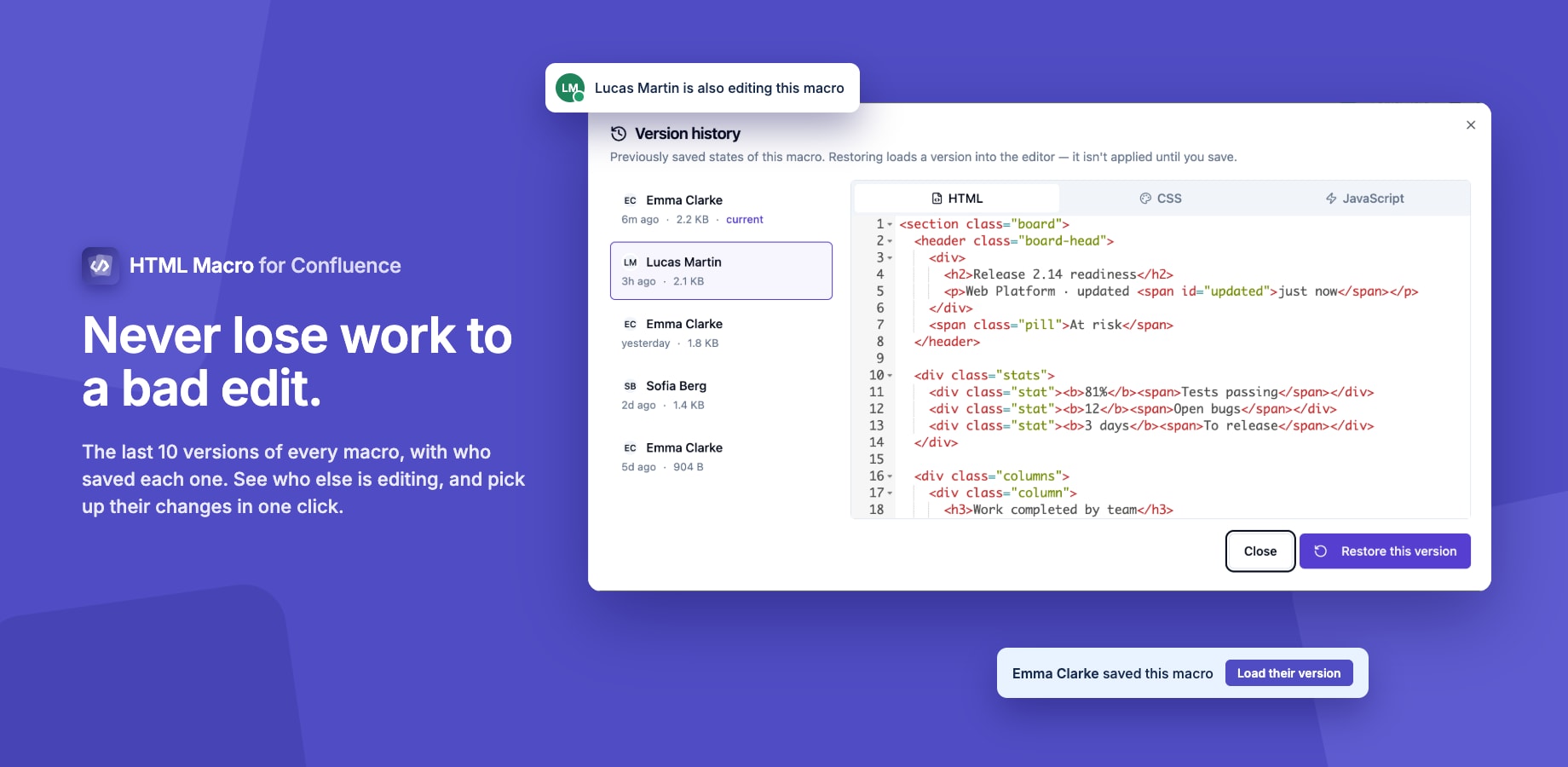
The editor keeps recent versions of every macro and shows who else is working on it, so a bad edit is easy to undo and two people don't silently overwrite each other.
Version History
Every save of a macro is recorded. To see them, click History in the editor.
- The last 10 versions of each macro are kept, newest first.
- Each version shows who saved it and when.
- Select a version to preview its HTML, CSS and JavaScript.
- Restore loads that version into the editor. Nothing changes on the page until you click Save, so you can look before you commit.
Saves by the same person within five minutes are combined into one version, so autosaves don't push older versions out.
A version larger than about 200 KB isn't recorded. The macro itself still saves normally.
History for a macro that hasn't been saved in about six months is cleared automatically, so removed macros don't keep data forever.
Seeing Who Else Is Editing
When someone else has the same macro open, the editor tells you before you start. The header shows everyone currently in the app, with a green dot for active and an amber dot for idle.
If one of them saves while you're editing, a banner names them: Alex saved this macro. Your editor is showing an older version. Click Load their version to pick up their changes, or keep working on yours.
Related
- HTML Editor
- Permissions: who can open the editor at all