


.png&w=64&q=75)
 for ConfluenceRuns on Atlassian
HTML Macro+ for Confluence Cloud
The free way to add HTML, CSS, JavaScript and iframes to Confluence Cloud pages, with live preview, version history and admin-grade security.
Build interactive charts, dashboards, embeds and branded layouts in a full HTML, CSS and JavaScript editor. It runs entirely on Atlassian Forge, so your code and content never leave Atlassian.
Why Confluence Cloud needs an HTML macro
Confluence Server and Data Center came with a built-in HTML macro. Confluence Cloud doesn't. If your team moved to Cloud, or wants more than text, tables and the standard macros, there's no native way to add your own HTML, CSS or JavaScript to a page.
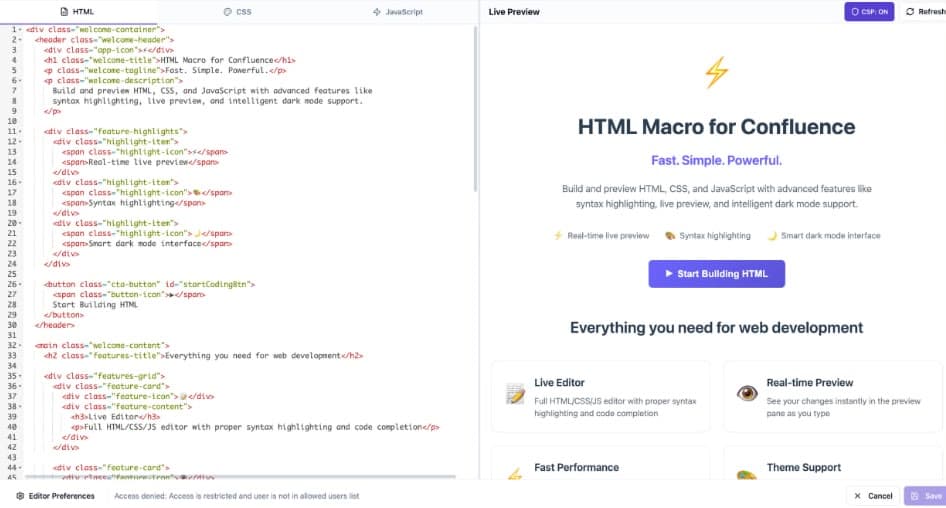
HTML Macro+ gives that back. Insert the macro, write your code, and see it rendered as you type. It runs entirely on Atlassian Forge, so your code and content never leave Atlassian's infrastructure, and admins decide which external sites can load and who is allowed to edit.
What HTML Macro+ for Confluence does
HTML, CSS & JavaScript editor
A three-tab code editor with syntax highlighting and auto-complete. Write markup, styles and scripts side by side.
Live preview
A resizable split view renders your page as you type. What you see is exactly what readers will see.
Realtime collaboration
See who else has the same macro open and get told the moment they save, with one click to load their version.
Version history
Every save is kept. Browse the last 10 versions, see who saved each one, preview it and restore it.
CSP security modes
Block all, Whitelist only or Allow all, enforced in the browser. A tightened policy reaches every macro immediately.
Domain whitelist
Allow exactly the external domains you trust, such as a CDN for Chart.js or youtube.com, and block everything else.
Editor permissions by user or group
Restrict the code editor to named users or Confluence groups. Everyone else sees only the rendered result.
HTML from attachments
Already have an HTML file? Render it straight from a page attachment or an upload, with no copy-pasting.
Works on public pages
Renders for anonymous and unlicensed viewers too, so it works in public spaces and knowledge bases.
Macro usage analytics
See every page that uses the macro, with a breakdown by space and a direct link to each page.
What teams build with HTML Macro+ for Confluence
Interactive charts
Bar, line, pie and doughnut charts built with Chart.js, right on the page.
See howStatus dashboards
Traffic-light status boards for projects, services or releases.
See howEmbeds and iframes
YouTube, Google Maps, Figma and other embeds, controlled by your domain whitelist.
See howCalculators and forms
Pricing calculators, estimators and simple interactive forms.
Sortable tables
Data tables your readers can sort and filter.
See howBranded layouts
Announcement banners, hero sections and custom page templates.
See how
What changes for your team
- Full HTML, CSS, and JavaScript support — no restrictions on what you can build
- Live side-by-side preview so you see exactly what visitors will see
- No more silent overwrites: see who else is editing and restore any of the last 10 versions
- Enterprise-grade CSP security with block-all, whitelist, and allow-all modes
- Runs entirely on Atlassian Forge — no external servers, no data leaving Atlassian
- Editor access by user or Confluence group, so only the right people can change code
- Automatic iframe height adjustment — no fixed heights, no blank space

Migrating from Confluence Server or Data Center
Moving to Cloud and worried about pages built on the old HTML macro? HTML Macro+ picks up where it left off.
Pages keep rendering
HTML Macro+ recognises the Server/Data Center HTML macro and the Macro Toolbox for Cloud HTML macro, so migrated pages display straight away with no manual rework.
Find every legacy macro
Scan any space to list the pages that still use the old macros.
Preview, then convert in bulk
See exactly what will change before you convert. Pages stay live throughout.
Security built on Atlassian Forge
Running custom JavaScript inside Confluence should never mean handing your content to a third party.
Nothing leaves Atlassian
HTML Macro+ runs on Atlassian Forge with no external servers. Your code and content are stored with the page, inside your own Confluence site.
You control what loads
Browser-enforced CSP blocks external scripts, styles, images and iframes unless you allow their domain.
You control who edits
Only the users and groups you pick can open the code editor. Viewers see the rendered result, never the source.
HTML Macro+ for Confluence at a glance
| Price | Free |
|---|---|
| Hosting | Atlassian Forge, no external servers |
| HTML, CSS and JavaScript | Yes, in separate tabs |
| Live preview while editing | Yes |
| Version history | Last 10 versions, one-click restore |
| Realtime collaboration | Yes |
| CSP modes and domain whitelist | Block all, Whitelist, Allow all |
| Editor permissions | Users and Confluence groups |
| Server/DC and Macro Toolbox migration | Yes, pages keep rendering, bulk convert |
| Render HTML from an attachment | Yes |
| Anonymous and public pages | Yes |
Questionsabout HTML Macro+ for ConfluenceAsk us something else
Guides and examples
- 5 ways to use HTML in Confluence CloudCustom CSS, embeds, HTML files, JavaScript and migrated pages.
- How to embed interactive charts in ConfluenceBar, line, pie and doughnut charts with Chart.js.
- How to build a custom status dashboard in ConfluenceA traffic-light status board, step by step.
- 5 things you can build with HTML Macro+Badges, timers, decision trees, tables and banners.
- Install HTML Macro+Get the app on your Confluence Cloud site.
- Security settingsCSP modes and the domain whitelist.
- Editor permissionsChoose which users and groups can edit code.
Install HTML Macro+ for Confluence on your site.
It runs on Forge, so it installs from the Marketplace and your content stays inside your own instance.