for ConfluenceRuns on Atlassian
Markdown Importer for Confluence Cloud
Import Markdown files into Confluence and export pages back to Markdown
Import .md files, folders or a ZIP into Confluence as a page tree, export pages back to Markdown, and publish from CI with the REST API.
Why Confluence needs a Markdown importer
Developers write in Markdown. Confluence stores pages in its own format and doesn't import .md files, so docs from a repository, a static site or another wiki get copied over page by page and reformatted by hand.
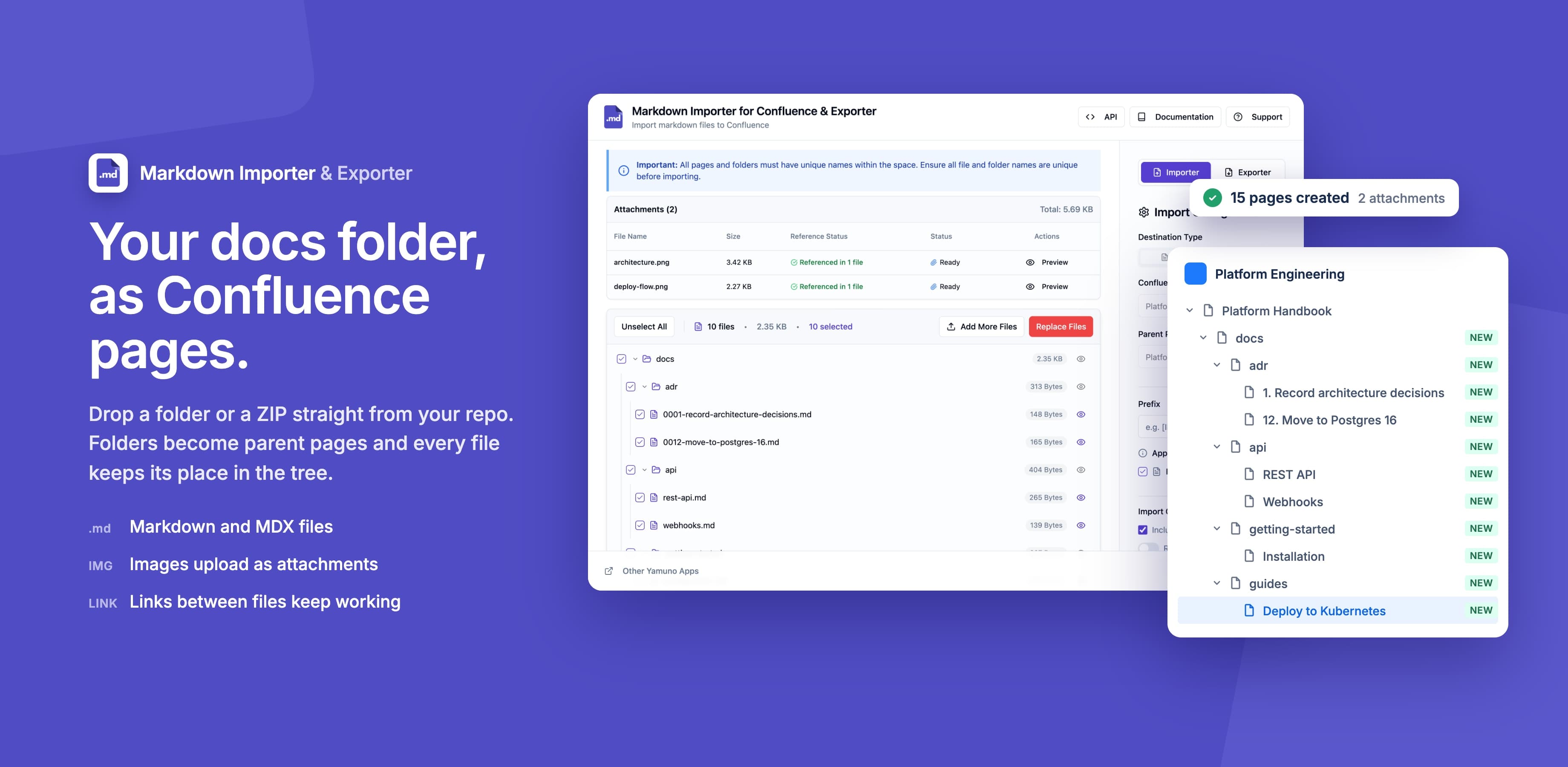
Markdown Importer turns a single file, a set of files or a ZIP of folders into Confluence pages, with headings, tables, code blocks and images kept and folders turned into a page tree. It also exports pages back to Markdown, and its REST API lets a CI pipeline publish docs on every merge.
What Markdown Importer for Confluence Cloud does
Bulk Import
Import a single .md file, many files at once, or a whole ZIP. There is no fixed file limit.
Page Export to Markdown
Export a single page or a page with all its children to Markdown
ZIP Upload & Download
Upload a ZIP of Markdown files, folders and attachments. Exports download as a ZIP too.
Space Export
Export a whole Confluence space to Markdown, with the page hierarchy kept as folders
Preview Support
Preview how a file will look in Confluence before you import it
Dark Mode
Supports dark mode
Markdown Support
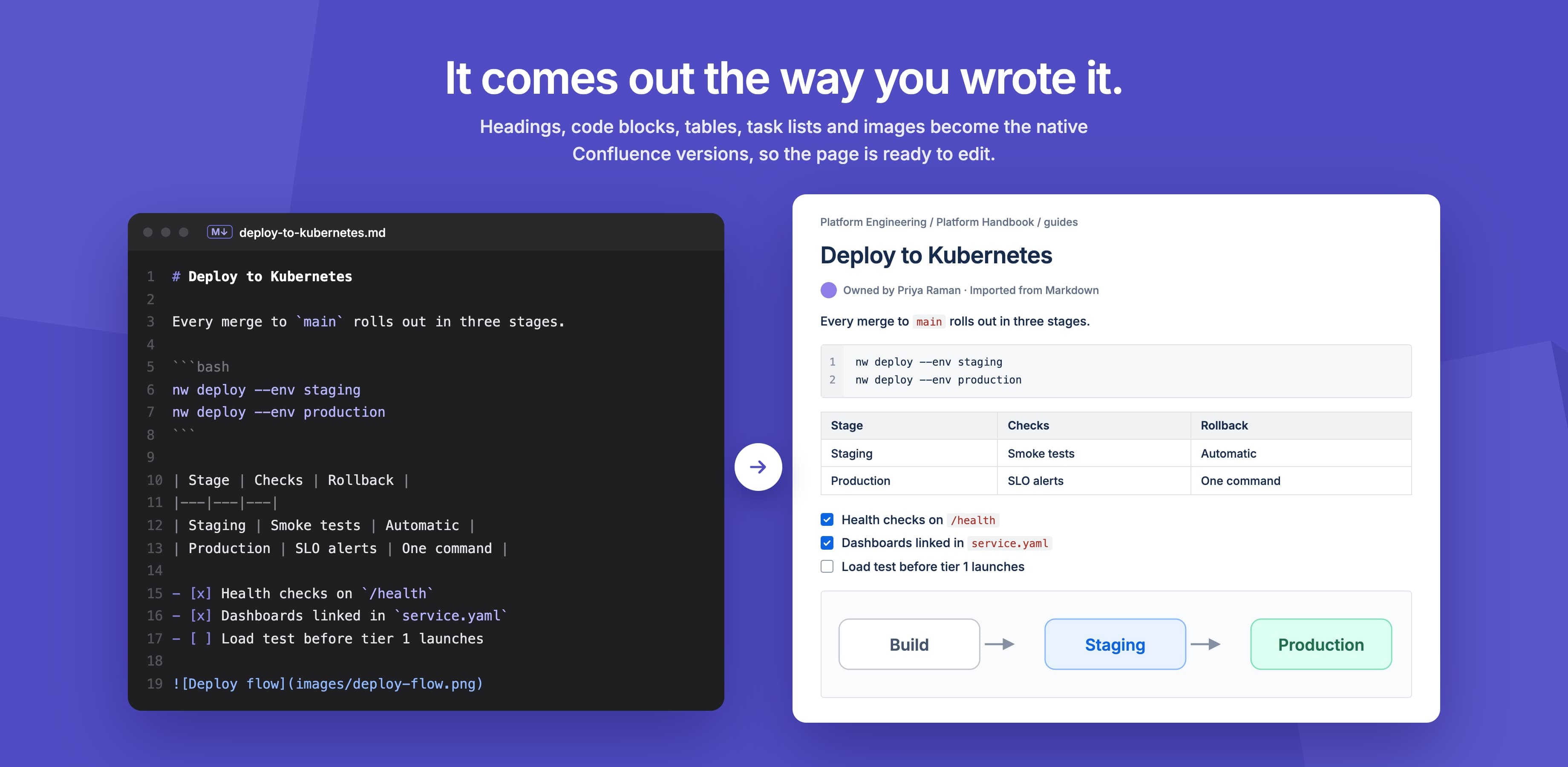
Headings, lists, tables, code blocks with syntax highlighting, task lists and images
Mermaid Diagrams
Import mermaid code blocks as code, or as diagrams drawn on the page by Mermaid Diagrams for Confluence or Markdown Macro+
File Hierarchy
Each folder becomes a parent page, so your folder structure becomes the page tree
Media Handling
Local images and attachments are uploaded on import and downloaded with relative links on export
REST API for CI/CD
Publish Markdown from a pipeline: one page per JSON request to your site's endpoint, authenticated with a Bearer token issued by the app
Global & Page Access
Open it from a page's ••• menu to work under that page, or from the Apps menu to target any space
Space-wide Operations
Admins can import into one, many or all spaces from global access
Built on Atlassian Forge
Runs on Atlassian, so your content never leaves Atlassian. API tokens are stored encrypted, expire after 1 to 30 days, and can be revoked at any time
What teams build with Markdown Importer for Confluence Cloud
Migrate docs from GitHub or GitLab
Bring a repository's docs folder across as a page tree in one upload.
See howSync Confluence with a repo
Publish changed Markdown files from GitHub Actions on every merge.
See howMove from Notion
Import a Notion Markdown export with its page hierarchy and images.
See howBulk import a docs site
Turn dozens or hundreds of Markdown files into pages from one ZIP.
See howDocs as code, both ways
Export pages back to Markdown for a repository or static site.
See how
What changes for your team
- Import a single .md file, many files or a whole ZIP, with no fixed file limit
- Folders become parent pages, so your folder structure becomes the page tree
- Local images and attachments are uploaded with the pages and the links updated
- Preview each file as a Confluence page before you import it
- Mermaid code blocks can become diagrams drawn on the page, with Mermaid Diagrams or Markdown Macro+
- Export pages, page trees or whole spaces back to Markdown as a ZIP
- A REST API for CI/CD, with encrypted tokens that expire after 1 to 30 days
Markdown Importer for Confluence Cloud keeps your content inside Atlassian
Read the Trust CenterRuns on Atlassian
Built on Forge, Atlassian's own app platform. Storage, authentication and permissions are Atlassian's, with no server of ours in the path.
Data residency
Your content stays in the region your Atlassian site is in and keeps the permissions you already set there.
Paperwork ready
A GDPR data processing agreement and a CAIQ Lite questionnaire are published for your security review.
DPACAIQ Lite
Markdown Importer for Confluence Cloud at a glance
| Hosting | Atlassian Forge, no external servers |
|---|---|
| Import | A single .md file, many files or a ZIP |
| File limit | No fixed limit; single files over about 2 MB may fail |
| Folder structure | Folders become parent pages |
| Images and attachments | Uploaded on import, relative links on export |
| Preview before import | Yes |
| Mermaid diagrams | Kept as code, or drawn with Mermaid Diagrams or Markdown Macro+ |
| Export to Markdown | Pages, page trees and whole spaces |
| Space-wide import | Admins can import into one, many or all spaces |
| REST API | One page per JSON request, Bearer token |
| API tokens | Encrypted, expire after 1 to 30 days, revocable |
Questionsabout Markdown Importer for Confluence CloudAsk us something else
Guides and examples
- How to import Markdown into ConfluenceA single file, a folder or a whole repository.
- Bulk import Markdown filesPreparing a large ZIP and checking the result.
- Sync docs from GitHub automaticallyA GitHub Actions workflow using the REST API.
- How to export Confluence to Markdown
- Import Mermaid diagramsTurn mermaid code blocks into diagrams on the page.
- Quick start
- REST API: getting started
Related apps
 HTML Macro+ for ConfluenceAdd HTML, CSS, JavaScript and iframes to Confluence Cloud pages, with shared variables, components and brand tokens, live preview, version history and admin security controls.
 LaTeX Math for ConfluenceLaTeX equation and formula macros for Confluence, rendered with KaTeX
.png&w=96&q=75) PDF Exporter for ConfluenceExport Confluence pages, page trees and spaces to PDF
PDF Exporter for ConfluenceExport Confluence pages, page trees and spaces to PDF
Install Markdown Importer for Confluence Cloud on your site.
It runs on Forge, so it installs from the Marketplace and your content stays inside your own instance.