


.png&w=64&q=75)
Dark Mode Support
LaTeX Math for Confluence automatically adapts to your Confluence theme with full dark mode support.
Overview
Dark mode support ensures your mathematical equations remain readable and aesthetically pleasing in both light and dark themes. The app automatically detects and adapts to Confluence's theme settings.
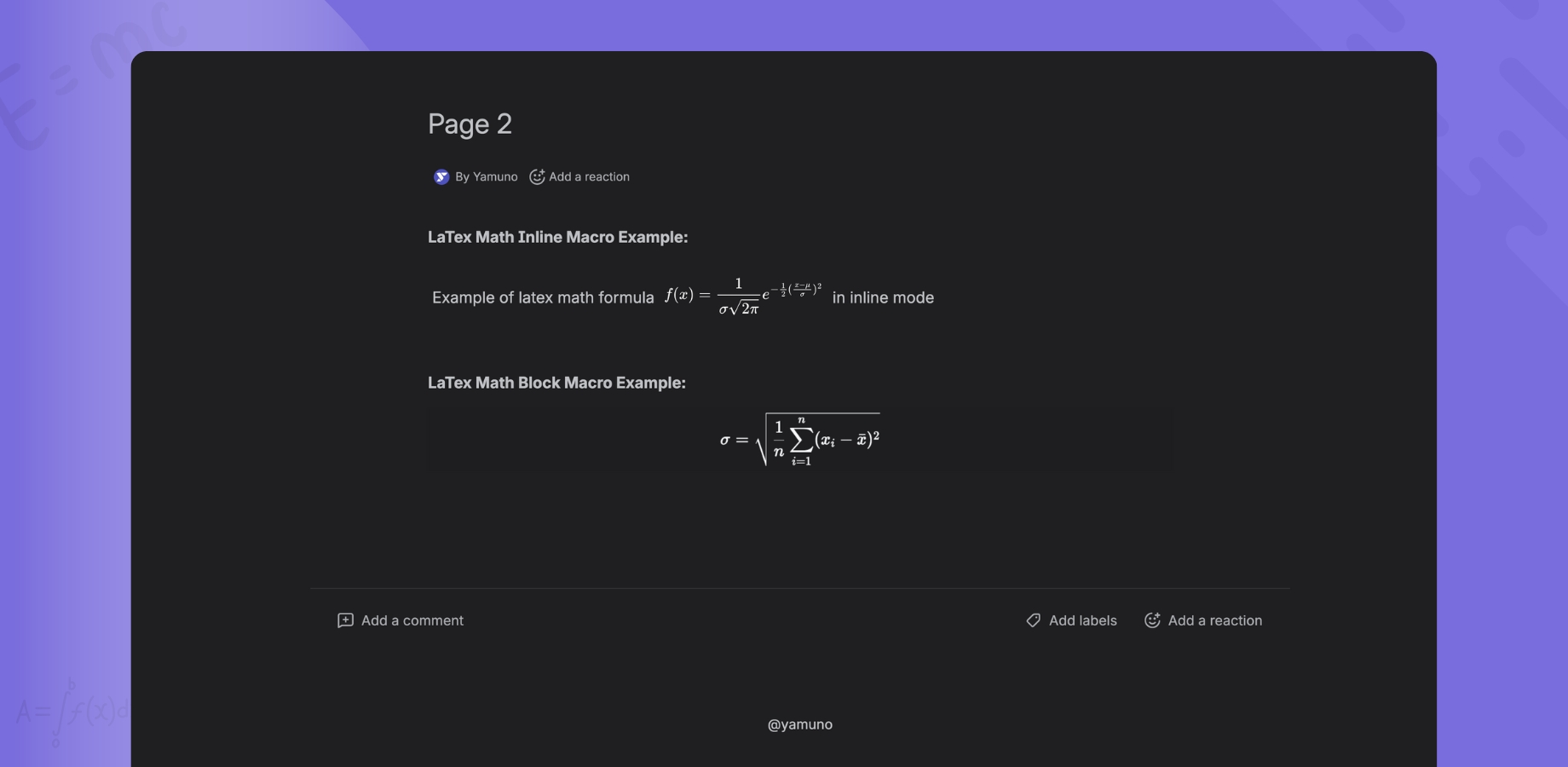
Features
- 🌙 Automatic Detection - Detects Confluence theme automatically
- 🎨 Seamless Integration - Equations blend with Confluence's color scheme
- ⚡ Instant Switching - No refresh needed when changing themes
- 👁️ Optimized Contrast - Readable in all lighting conditions
- 🎯 Consistent Experience - Same quality in light and dark modes
How It Works
Automatic Theme Detection
The app uses Atlassian's theme detection API:
- Confluence Theme Changes → App detects the change
- Automatic Update → Equations update colors instantly
- No Configuration → Works out of the box
Theme Support
Light Mode
- Dark text on light background
- High contrast for readability
- Standard mathematical typography
Dark Mode
- Light text on dark background
- Reduced eye strain
- Adjusted contrast ratios
Enabling Dark Mode
In Confluence
- Click your profile picture (top right)
- Select Settings
- Go to Theme
- Choose:
- Light - Light mode
- Dark - Dark mode
- System - Follow OS settings
The App Adapts Automatically
Once you change Confluence's theme:
- ✅ All LaTeX equations update instantly
- ✅ Editor interface matches theme
- ✅ Preview pane updates
- ✅ No page refresh needed
Visual Examples
Light Mode Appearance
Inline Equations:
- Black text on white background
- Clear, crisp rendering
- Optimal daytime viewing
Block Equations:
- Centered with standard typography
- High contrast
- Professional appearance
Dark Mode Appearance
Inline Equations:
- Light text on dark background
- Reduced eye strain
- Comfortable nighttime viewing
Block Equations:
- Adjusted contrast
- Softer colors
- Maintains readability
Editor Experience
Light Mode Editor
Code Pane:
- Light background
- Dark text
- Syntax highlighting optimized for light mode
Preview Pane:
- White background
- Black equations
- Simulates light mode Confluence page
Dark Mode Editor
Code Pane:
- Dark background
- Light text
- Syntax highlighting optimized for dark mode
Preview Pane:
- Dark background
- Light equations
- Simulates dark mode Confluence page
Color Adjustments
Text Colors
| Element | Light Mode | Dark Mode |
|---|---|---|
| Main equation | Black (#000) | Light (#E8E8E8) |
| Operators | Black (#000) | Light (#E8E8E8) |
| Variables | Black (#000) | Light (#E8E8E8) |
| Background | White (#FFF) | Dark (#1F1F21) |
Accent Colors
Primary colors (like links) use Confluence's theme colors:
- Automatically adjusted for each theme
- Maintains brand consistency
- Ensures proper contrast
Accessibility
Contrast Ratios
Light Mode:
- Text contrast: 21:1 (exceeds WCAG AAA)
- High readability
Dark Mode:
- Text contrast: 15:1 (exceeds WCAG AAA)
- Reduced glare
- Comfortable for extended reading
Benefits
- ✅ Reduced eye strain in low light
- ✅ Better for nighttime work
- ✅ Improved focus on equations
- ✅ Accessibility compliant
Best Practices
✅ Do's
- Test both themes - Verify equations look good in both
- Use standard LaTeX - Avoids rendering issues
- Leverage automatic detection - Don't fight the theme
- Consider your audience - Many users prefer dark mode
❌ Don'ts
- Don't hardcode colors - Let the app handle theme colors
- Don't use color for meaning - Some users can't distinguish
- Don't override theme - Respect user preferences
- Don't assume light mode - Test in both themes
Troubleshooting
Equations Not Updating Theme
Problem: Equations stay in light mode when switching to dark
Solutions:
- Hard refresh the page (Ctrl/Cmd + Shift + R)
- Clear cache and reload
- Check Confluence theme is actually set to dark
- Verify browser supports theme detection
- Contact support if issue persists
Poor Contrast
Problem: Equations are hard to read in dark mode
Solutions:
- Adjust monitor brightness
- Try Confluence's theme settings
- Verify no custom CSS is interfering
- Report issue to support with screenshots
Editor Theme Not Matching
Problem: Editor doesn't match Confluence theme
Solutions:
- Close and reopen the editor
- Refresh the Confluence page
- Check browser console for errors
- Try different browser
Colors Look Wrong
Problem: Equation colors don't match expectations
Solutions:
- Verify theme is properly set in Confluence
- Check for browser extensions affecting colors
- Disable custom styles if any
- Compare with other Confluence content
Theme Switching
Instant Updates
When switching themes:
- No page refresh required
- All macros update simultaneously
- Editor adjusts if open
- Smooth transition - no flashing
Performance
Theme switching is optimized:
- ⚡ Updates in <100ms
- 🚀 No performance impact
- 💾 No additional load time
- ✅ Works with hundreds of equations
Technical Details
CSS Variables
The app uses CSS variables for theme colors:
--foreground: Theme text color
--background: Theme background color
--muted: Secondary colors
--border: Border colors
Theme Detection API
Uses Atlassian's @atlaskit/tokens:
useThemeObserver() // Detects theme changes
Color Inversion
Not a simple color inversion:
- Custom color palette for dark mode
- Optimized contrast ratios
- Maintains mathematical typography
Mobile Support
Responsive Theme Detection
Dark mode works on:
- 📱 iOS devices (system theme)
- 🤖 Android devices (system theme)
- 💻 Tablets (Confluence theme)
- 🖥️ Desktop browsers
Battery Saving
Dark mode can help:
- Reduce screen power consumption (OLED displays)
- Extend battery life on mobile
- Less eye strain
System Theme Integration
"Follow System" Option
If Confluence is set to follow system:
- OS changes theme (day/night)
- Confluence updates automatically
- LaTeX equations adapt instantly
- Seamless experience
Supported Operating Systems
- ✅ Windows 10+ (Dark Mode)
- ✅ macOS 10.14+ (Dark Mode)
- ✅ Linux (Desktop Environment dependent)
- ✅ iOS 13+ (Dark Mode)
- ✅ Android 10+ (Dark Theme)
Custom Confluence Themes
Third-Party Themes
The app attempts to adapt to custom Confluence themes:
- Detects custom color schemes
- Adjusts equation colors
- May require manual testing
Known Limitations
Some custom themes may:
- Have non-standard contrast
- Use unexpected color schemes
- Require additional adjustments
💡 Tip: Test your equations in your custom theme and report any issues.
Future Enhancements
Planned Features
- 🎨 Custom color schemes
- 🌈 High contrast mode option
- ⚡ Color customization
- 📊 Accessibility improvements
Request Features
Have suggestions? Contact us
Comparison with Other Apps
LaTeX Math for Confluence
- ✅ Automatic theme detection
- ✅ Instant switching
- ✅ Optimized contrast
- ✅ No configuration needed
- ✅ Mobile support
Traditional LaTeX Renderers
- ❌ Manual theme selection
- ❌ Page refresh required
- ❌ Poor dark mode support
- ❌ Fixed colors
- ❌ Desktop only
Related Documentation
- 📖 Live Preview - Editor features
- 📖 Inline Macro - Inline equations
- 📖 Block Macro - Display equations
- ❓ FAQ