

Documentation
Markdown Exporter for ConfluenceBrowse
Documentation
Markdown Exporter for ConfluenceConfiguration & Export History
The Configuration tab is accessible from the Confluence app management panel. It provides admin-level controls and a log of all exports performed across your instance.
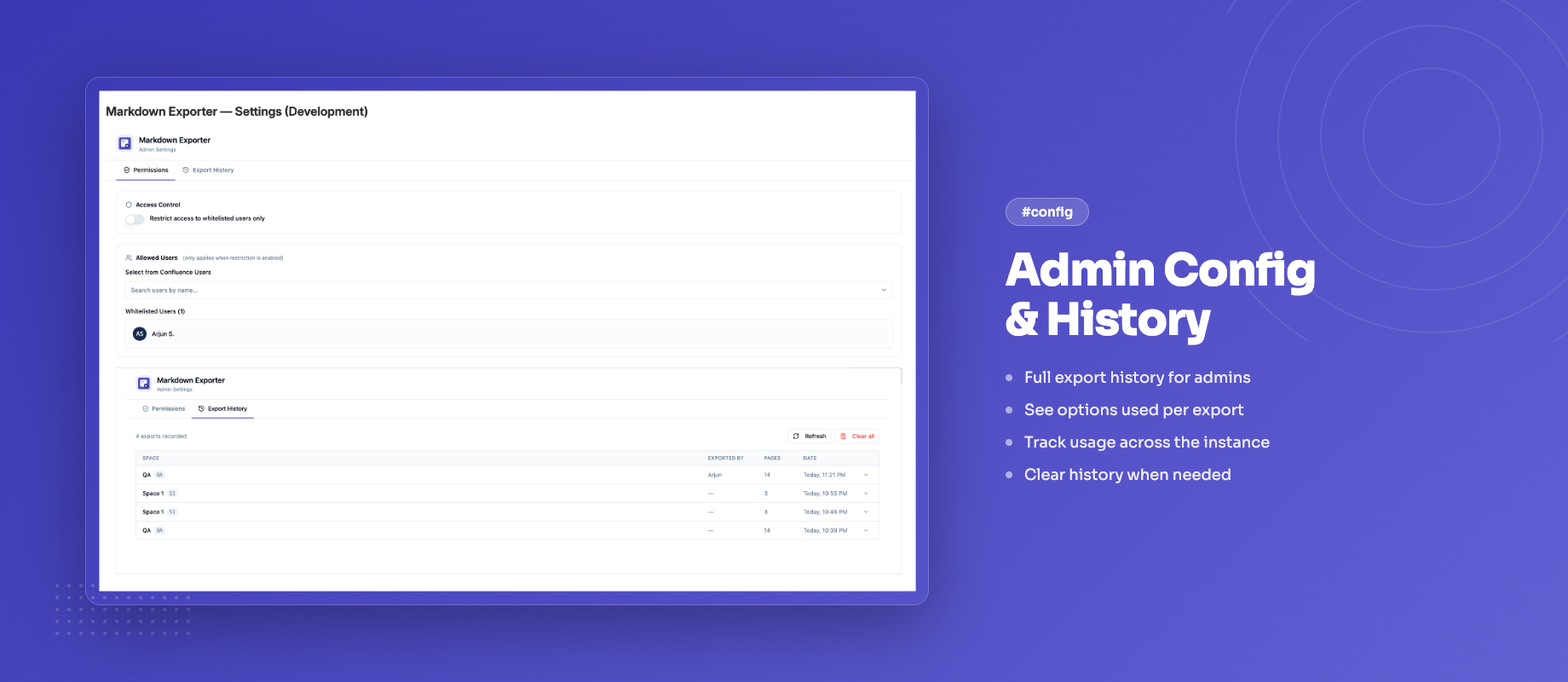
Accessing the Configuration Panel
- Go to Confluence Settings → Apps
- Find Markdown Exporter for Confluence in the list
- Click Configure
Only Confluence administrators can access the configuration panel.
Export History
The Export History table shows a record of every export triggered by any user in your instance.
Table Columns
| Column | Description |
|---|---|
| Space | The Confluence space the export was run from |
| Exported by | The display name of the user who triggered the export |
| Pages | Number of pages included in the export |
| Date | Date and time the export was performed |
Expanding a Row
Click any row to expand it and see:
- The list of page titles included in the export
- Option badges showing the settings used (e.g. ZIP, Front matter, Obsidian mode)
Click the row again to collapse it.
Clearing History
Click Clear history to permanently delete all export history entries. This action cannot be undone.
Export history is stored per-instance and is only visible to administrators. Individual users cannot see each other's export activity.
Data Retention
Export history entries are stored using Confluence's built-in Forge key-value storage. There is no automatic expiry — entries persist until manually cleared.
If your instance has high export volume, it is recommended to clear history periodically to keep the table manageable.
Guides for Markdown Exporter for Confluence
Stuck on something this page does not cover? Ask the developers.