Issue History+ for Jira is live on the Marketplace
Short answer: Issue History+ for Jira is now on the Atlassian Marketplace, and it's free. It reads the change history Jira already records and lets you search it for a whole project, sprint or JQL query, see how long work spends in each status, and find stuck work, rework and SLA breaches. It runs on Atlassian Forge, so your issue data never leaves Atlassian.
Jira writes down every change to every issue: who moved it, who reassigned it, who rewrote the description, and when. Reading that record is the hard part. The History tab shows one issue at a time, so answering "who moved these tickets back to In Progress last week?" means opening them one by one. We built Issue History+ to answer that kind of question in one search.
What the app does
Search the change history of many issues at once
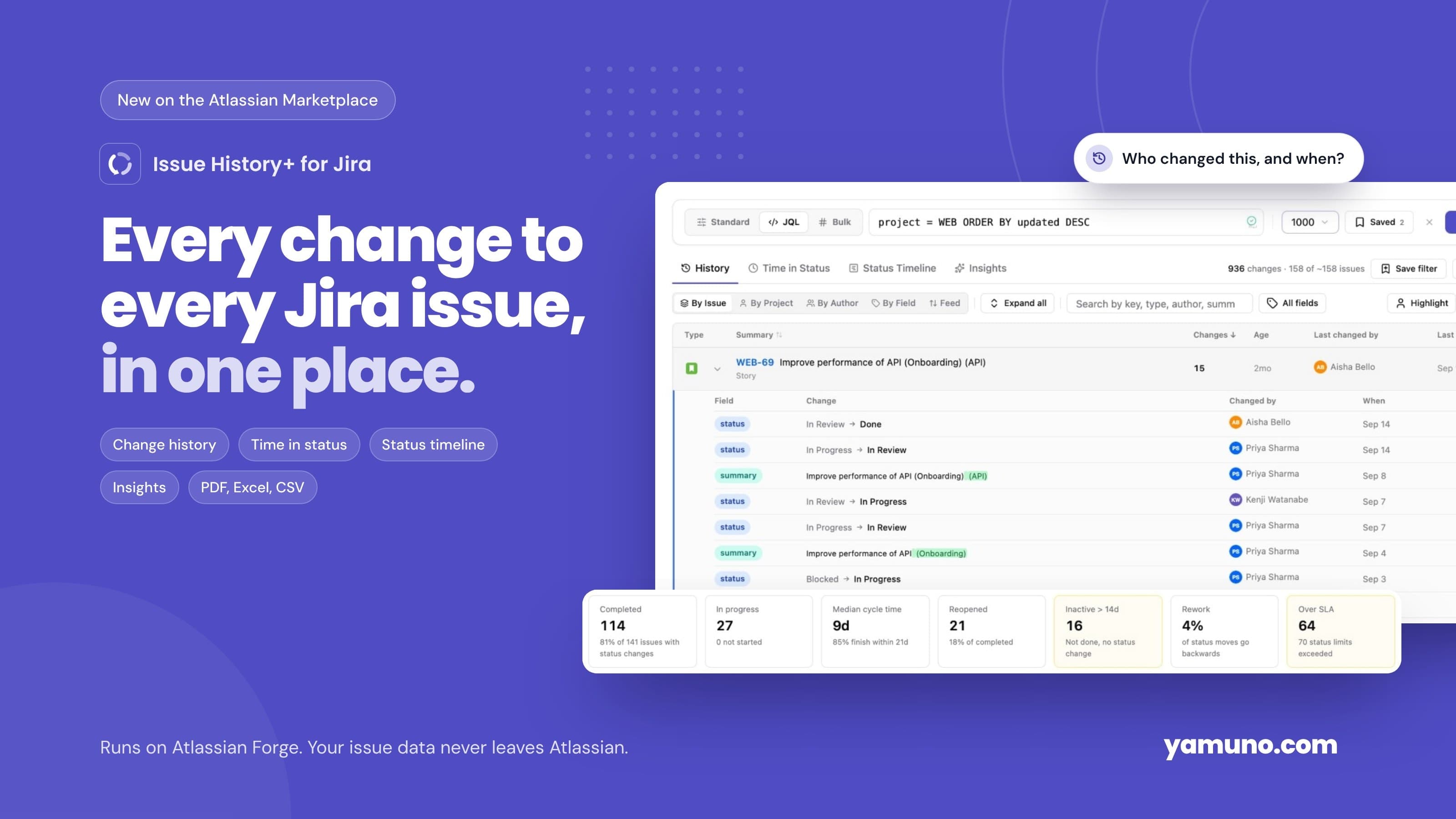
Open Apps → Issue History, pick a project and a date range, and click Search. You get every field change for the matching issues in one table. There are three ways to choose the issues:
- Standard: project, sprint, issue type, assignee, reporter, label, group and date range
- JQL: paste a query you already use, with autocomplete and validation
- Bulk: a list of issue keys, for example from a release note
Group the results by issue, project, author or field, or read them as a feed. Summary and description edits show word-level differences, so you can see exactly which words changed instead of comparing two long paragraphs. Highlight marks every change one person made. The searching history guide covers each option.
Time in status
The Time in Status tab shows, for each status, the median time per visit and the time 85% of visits finish within. We chose those over averages on purpose: one issue forgotten in review for three months can drag an average far from what a typical issue experiences, while the median and the 85th percentile stay honest.
Time runs from the moment an issue enters a status until it leaves, and repeat visits are added up. You can count calendar time or business hours, and set an SLA per status so breaching issues are marked. A per-issue table lets you sort by any status to find the issues that spent longest there. The time in status guide explains how each number is calculated.
Status timeline
The Status Timeline tab draws each issue's path through your workflow as one bar, coloured by status category. It makes ping-pong between In Progress and In Review easy to spot, which is hard to see in a list of changes.
Insights
Insights summarises the current search:
- Completed and in-progress issues
- Median cycle time and the cycle time 85% of issues finish within
- Reopened issues: anything that left Done at least once
- Inactive work: issues that are not done and have had no status change for 7, 14 or 30 days
- Rework: the share of status moves that go backwards
- SLA breaches, worst first
It also shows issues completed per week, the most common status changes, when changes happen during the week, and who changes what. Every metric is defined in the Insights guide.
Because the app uses each status's Jira category (To Do, In Progress, Done), custom statuses such as Shipped or Won't Fix count correctly without any setup.
Issue Insights on every issue
Each issue gets an Issue Insights tab in its Activity section. It shows that issue's total time in each status, its status timeline and every change, newest first. You don't need to leave the issue to see where it has been.
Restore
For status, assignee, priority and summary, Restore puts the field back to the value it had before a change. It uses Jira's normal edit and transition permissions, so it only works where you could make that change in Jira yourself.
Reports for people outside Jira
Export the current search to CSV, Excel or a PDF report with your company name and logo. Excel and PDF exports include SLA thresholds and how many issues went over them. You can also save a search as a private bookmark, and your last ten searches are one click away.
Your data stays in Atlassian
Issue History+ runs entirely on Atlassian Forge and declares no egress, so issue data is never sent to an external server. Every request runs as the signed-in user, which means people only see history for issues they can already browse in Jira.
The app stores only each user's saved searches, recent searches, settings and PDF branding, in Forge storage for your site. It doesn't store issue data, names or email addresses. The data and privacy page lists everything it reads and stores, along with each permission it asks for. If you are comparing apps on this point, our Forge security checklist explains what "runs on Atlassian" means in practice.
Who it's for
- Scrum masters and team leads who want to see where work waits and which issues have gone quiet, before stand-up
- Jira admins answering "who changed this field, and when?" for many issues at once
- Support and service teams tracking time in each status against an SLA
- Product and delivery managers who need cycle time and throughput without building a spreadsheet; our guide to Jira reporting for product managers shows where it fits alongside Jira's own reports
- Anyone reporting to stakeholders who don't use Jira, through PDF and Excel exports
For a walkthrough of a full setup, from measuring time in status to setting SLAs, see the time in status and issue history use case. If you also want charts on your Jira dashboard, Charts for Jira Dashboard works well next to it.
Getting started
- Install Issue History+ for Jira from the Atlassian Marketplace.
- Open Apps → Issue History, choose a project and keep the default last 30 days.
- Click Search, then open the Time in Status and Insights tabs.
- Open any issue and choose Issue Insights under Activity.
- Click Export to share a report.
The quick start takes about ten minutes.
Frequently asked questions
How much does Issue History+ cost?
It's free on the Atlassian Marketplace.
Where does the history come from?
From Jira's own changelog, read through the Jira REST API as the signed-in user. The app fetches the complete history of each issue, not only the most recent changes.
Can people see history for issues they can't access?
No. Every request runs with the viewing user's Jira permissions, so people only see history for issues they can already browse.
Does it work with company-managed and team-managed projects?
Yes. Both project types record the standard Jira changelog, which is what the app reads.
Does it change anything in Jira?
Only when someone clicks Restore, and only for status, assignee, priority or summary. Everything else is read only.
Try it
Install Issue History+ for Jira and run your first search. Questions or feedback? Reach us through our support portal. Your input shapes what we build next.