.png&w=48&q=75)
PDF Exporter adds scheduled exports and a REST API
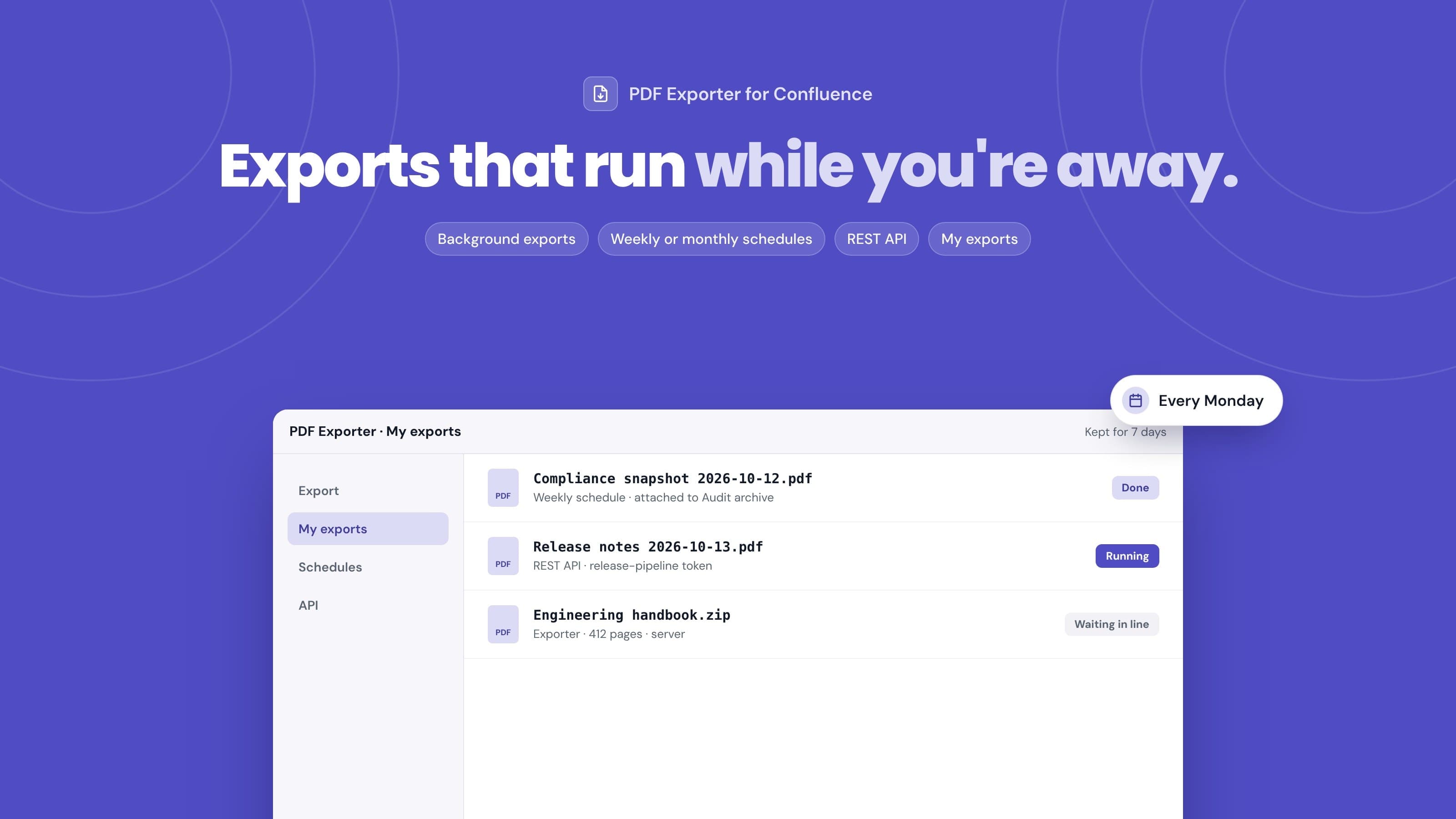
Short answer: the 13 October 2026 release of PDF Exporter for Confluence is the biggest since launch. Large exports now run on Atlassian's servers in the background, so you can close the page while they finish. Schedules export a space or page tree every week or month and attach a dated PDF to an archive page. And a REST API lets scripts and CI/CD pipelines start exports with an API token.
Until now, every export was built in your browser. That works well for a handful of pages, but a 400-page space export meant keeping a tab open, and a monthly compliance snapshot meant someone remembering to click Export on the first of the month. This release is about taking both of those jobs off people's hands.
Background exports and My exports
The exporter's sidebar has a new Where to generate option:
- Auto (recommended): small exports are built in your browser, large ones go to the server. The exporter tells you which it picked and why.
- This browser: always build locally. Fastest for a few pages, but the page has to stay open.
- Server (background): always build on the server, and leave whenever you like.
With Auto, an export moves to the server when it has more than 30 pages, more than 60 attachments, or more than 50 MB of attachments.
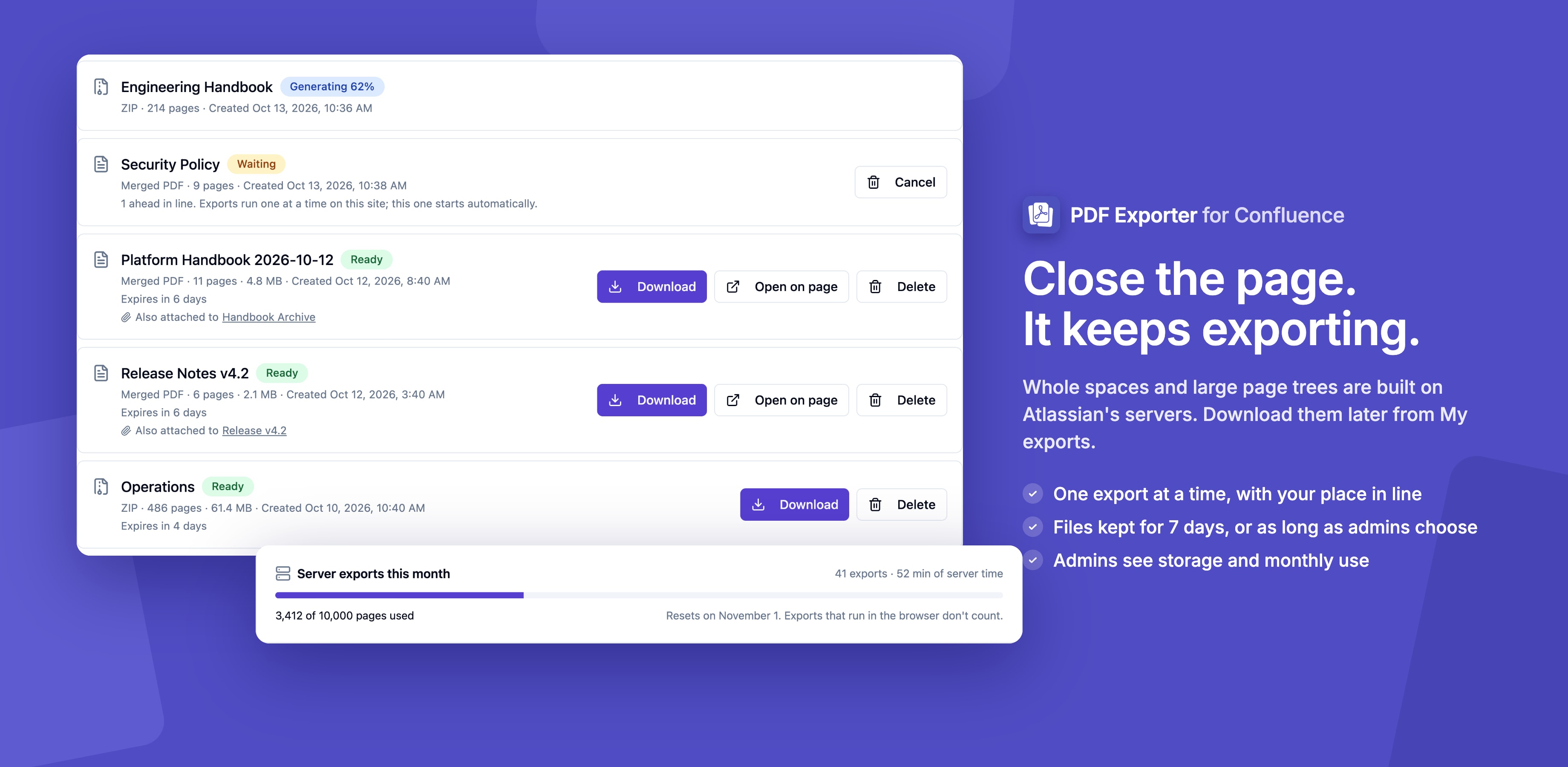
A progress card shows each step (fetching pages, rendering, laying out the PDF). When it's done you can download from the card, or find the file later under My exports in the sidebar. If you close the exporter mid-export, the card comes back the next time you open it.
My exports keeps your server exports for 7 days by default. Large ZIP exports come in parts, download links are created when you click, and exports attached to a page have an Open on page link. Site admins set the retention period (1 to 90 days) and a storage limit for the site under Confluence Settings → PDF Exporter → Exports & storage.
Background exports run on Atlassian Forge and the files sit in Atlassian's own storage. Nothing leaves Atlassian. The background exports docs cover the details.
Scheduled exports
Schedules are for teams that keep audit or retention copies of their documentation, or anyone who needs a monthly "as it was" copy.
Open Apps → PDF Exporter for Confluence, choose Schedules in the sidebar and click New schedule. A schedule has:
- What to export: a page and its children, or a whole space
- Style Template: any saved template; template edits apply to the next run
- Output: one merged PDF or a ZIP of PDFs
- How often: weekly on a weekday, or monthly on a date from 1 to 28
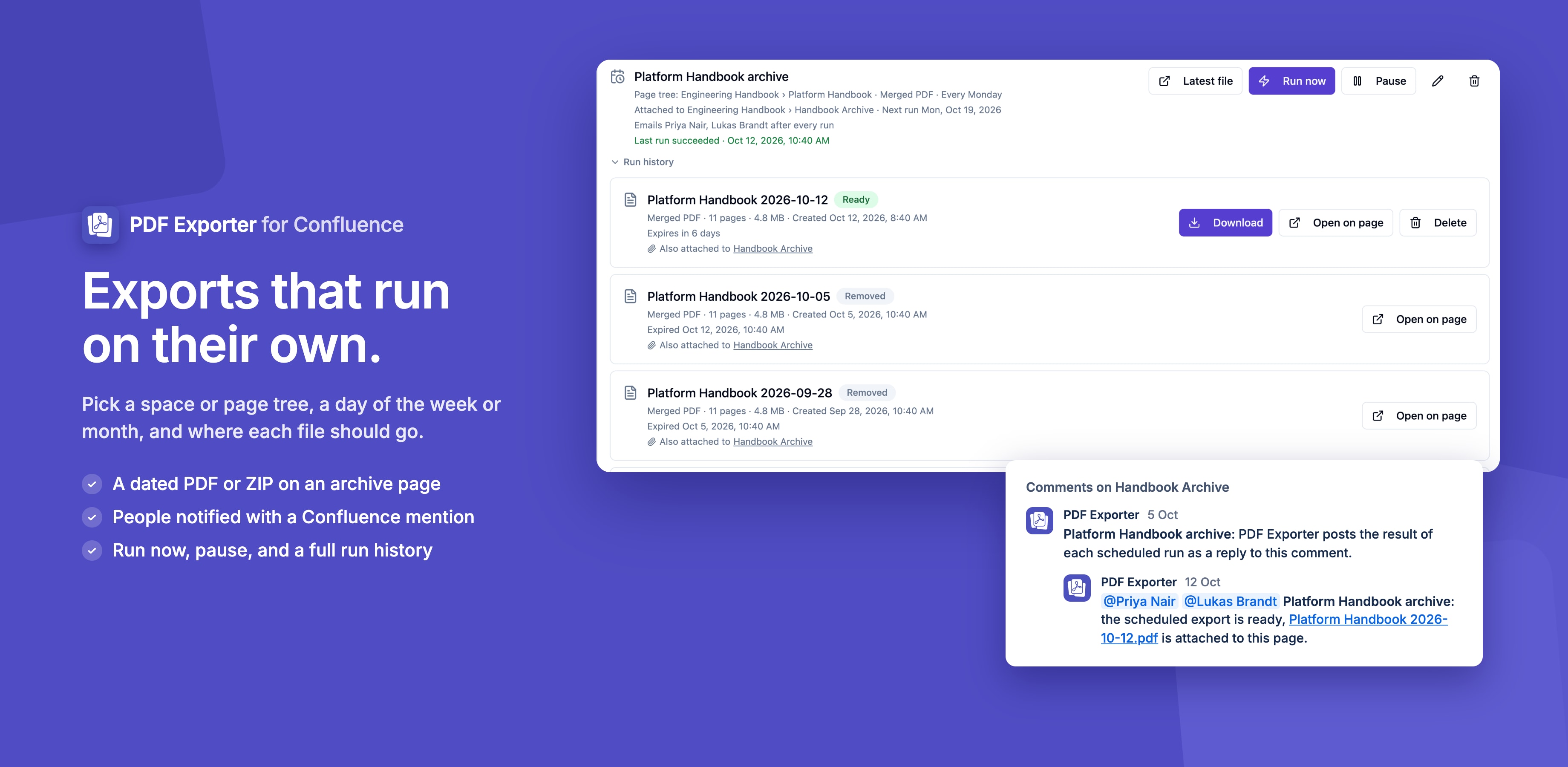
- Where it goes: attached to an archive page you choose, or kept in My exports only
- Notify by email: every run, only failures, or off
When a run attaches its file to an archive page, the file is named with the schedule name and the run date, for example Compliance snapshot 2026-11-01.pdf. The page's attachments then list every run in order, and those files stay until someone deletes them.
Email notifications without noise
Notifications use Confluence itself. After a run, the app comments on the archive page and @mentions the people you picked, and Confluence emails them as it does for any mention. Each schedule keeps one comment thread and adds every later run as a reply, so a weekly schedule doesn't bury the page in comments after a year. Only failures keeps the thread quiet unless something goes wrong.
Failures you can act on
A failed run shows its reason in plain words, such as "Archive page was deleted". Problems that can't fix themselves (a deleted archive page, a deleted space, an owner who left) pause the schedule straight away. Other failures pause it after three in a row. Run now runs a schedule immediately without moving its regular dates, which is handy for a first test. Site admins see every schedule on the site, with its owner, status and next run.
Each run uses the access of the person who created the schedule, so it only exports pages they can view. The scheduled exports docs list every option. For the bigger picture on audit copies, see Confluence PDF export for compliance teams.
A REST API for scripts and pipelines
Some exports belong to a process rather than a person: release notes at the end of a deployment, a spec frozen when a project closes, a nightly copy of a runbook space. The new REST API covers those.
A site admin creates a token under Confluence Settings → PDF Exporter → API, choosing an expiry of 30 days, 90 days, 180 days or 1 year. Then one request starts an export:
curl -X POST 'YOUR_ENDPOINT_URL' \
  -H 'Authorization: Bearer YOUR_TOKEN' \
  -H 'Content-Type: application/json' \
  -d '{"pageId": "123456", "name": "Release notes"}'
A 202 response means the export started. The request can export a page, a page tree or a space, use any saved template, attach the file to a page and @mention up to 10 people. Send a requestId and a retried request starts nothing new. Each token has a Recent calls log of its last 25 requests, and only a hash of the token is stored.
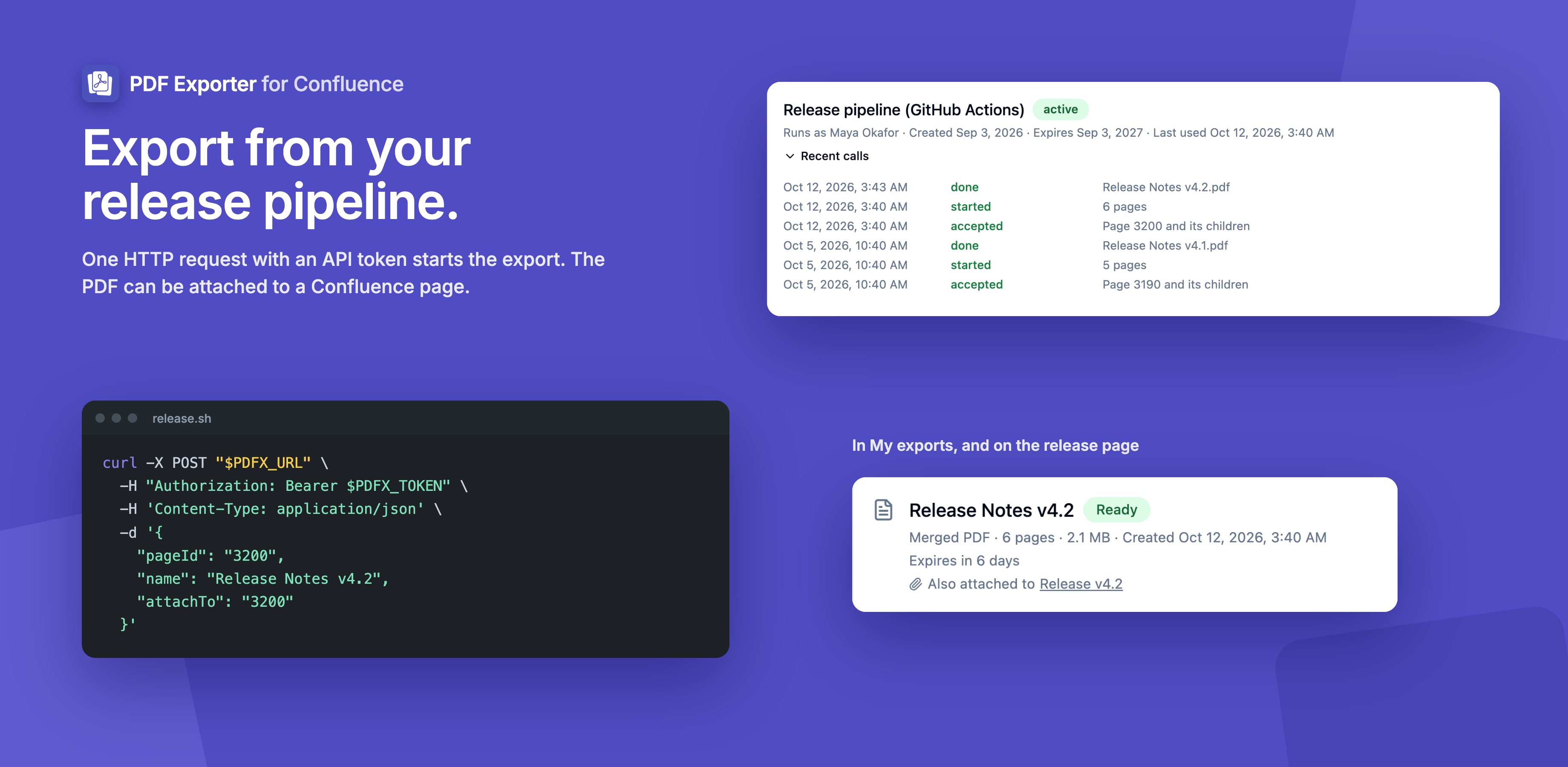
One design choice is worth knowing about. API responses are fixed messages and carry no page data, and no data is sent out of Atlassian. That keeps PDF Exporter eligible for Atlassian's Runs on Atlassian program. It also means the response tells you the export started, not where the file is: you pick it up in My exports, on the page you attached it to, or from the mention email. The REST API guide and examples show common jobs.
If you already automate Confluence content, the same token-based approach is used by the Markdown Importer REST API.
Fair use: one server export at a time
Server exports run one at a time per site, and that includes scheduled runs and API calls. When another export is running, yours shows Waiting in Line with its place in the queue and a Cancel button, and starts on its own.
Each site can render 10,000 pages a month on the server. Browser exports don't count toward that, and the allowance resets on the first of each month (UTC). Admins see this month's usage under Server exports this month.
Because server exports need new permissions, sites on an older version see a notice that an update is waiting, with a link to Manage apps for admins.
Smaller changes and fixes
- The exporter and the settings page now use a sidebar, and remember the open section in the page address
- Clicking Export shows Preparing Export straight away, and the button can't be clicked twice
- Custom emoji keep their image, panels keep their background colour and decision items keep their formatting
- Table of contents zone macros are no longer left out
- Long code lines without spaces wrap instead of running off the page
- Embeds without a source show a named "not included" note
The full list is in the release notes.
Frequently asked questions
Do I need to do anything to get the new features?
A site admin needs to approve the update in Manage apps, because server exports use new permissions. Until then the exporter shows a notice with a link.
Do small exports still happen in my browser?
Yes. With Where to generate set to Auto, exports of up to 30 pages (and within the attachment limits) are still built in your browser and download straight away. You can also force either option.
How long are background exports kept?
Seven days by default. Admins can set anything from 1 to 90 days, plus a storage limit for the site. Files that a schedule or API call attached to a Confluence page stay on that page until someone deletes them.
Can a scheduled export run at a set time of day?
No. Schedules run once on their day, and Confluence picks the time. Dates are in UTC, so a schedule says "every Monday", not "every Monday at 9:00".
What can the REST API export?
A single page, a page tree or a whole space, with any saved template, as one merged PDF (up to 500 pages) or a ZIP of separate PDFs (up to 2,000 pages). Each token can start 30 exports an hour.
Does any of this send data outside Atlassian?
No. Background and scheduled exports run on Atlassian Forge and store files in Atlassian's storage, and API responses carry no page data.
Try it
Install PDF Exporter for Confluence from the Atlassian Marketplace, or update it under Manage apps if you already have it. New to the app? Start with how to export Confluence to PDF or the getting started guide.
Questions or feedback? Reach out via our support portal.
.png&w=96&q=75)