Switching LaTeX Math Apps in Confluence
If you've tried to switch from one LaTeX math app to another in Confluence, you know the problem. Hundreds of pages and thousands of equations are stored in one vendor's macro format. Re-entering every formula by hand is not realistic.
That's why we built migration support into LaTeX Math for Confluence.
The Problem
Teams in engineering, academia and finance rely on LaTeX equations in their Confluence documentation. Sometimes the current math app stops fitting: rendering is slow, a feature is missing, or the pricing changed.
The formulas, though, are stored in that app's macro format, spread across many spaces and pages. Without a migration tool, moving to a new app means either:
- Finding and re-entering every equation by hand, or
- Staying with an app that no longer meets your needs.
How the Migration Tool Works
LaTeX Math for Confluence includes a migration wizard that finds equations from other LaTeX math apps, converts them and replaces the old macros on the page. It runs in a few steps, and you choose which pages to migrate.
Step 1: Open the Migration Tab
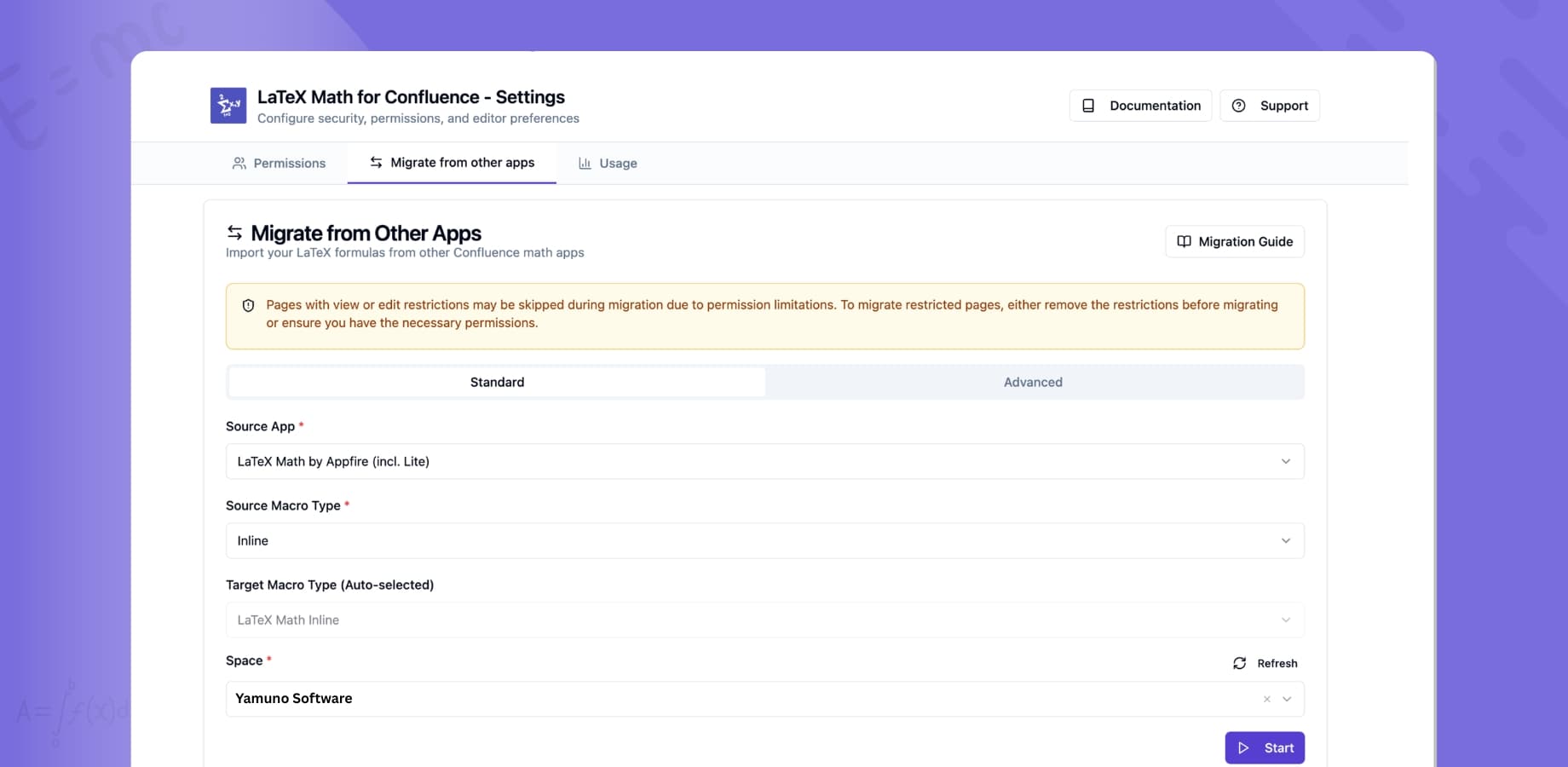
Go to Confluence Admin → Manage Apps → LaTeX Math for Confluence → Configure and open the Migrate from other apps tab.
Step 2: Choose Your Source App
Select the app you're migrating from. The supported source apps are:
- LaTeX and MathJax by The Plugin People
- LaTeX Math by Appfire
- LaTeX Math Lite by Appfire
- LaTeX Math (Easy Math) by Narva Software
Migrating from an app that isn't listed? The Advanced tab lets you enter any macro name manually.
Step 3: Search Your Spaces
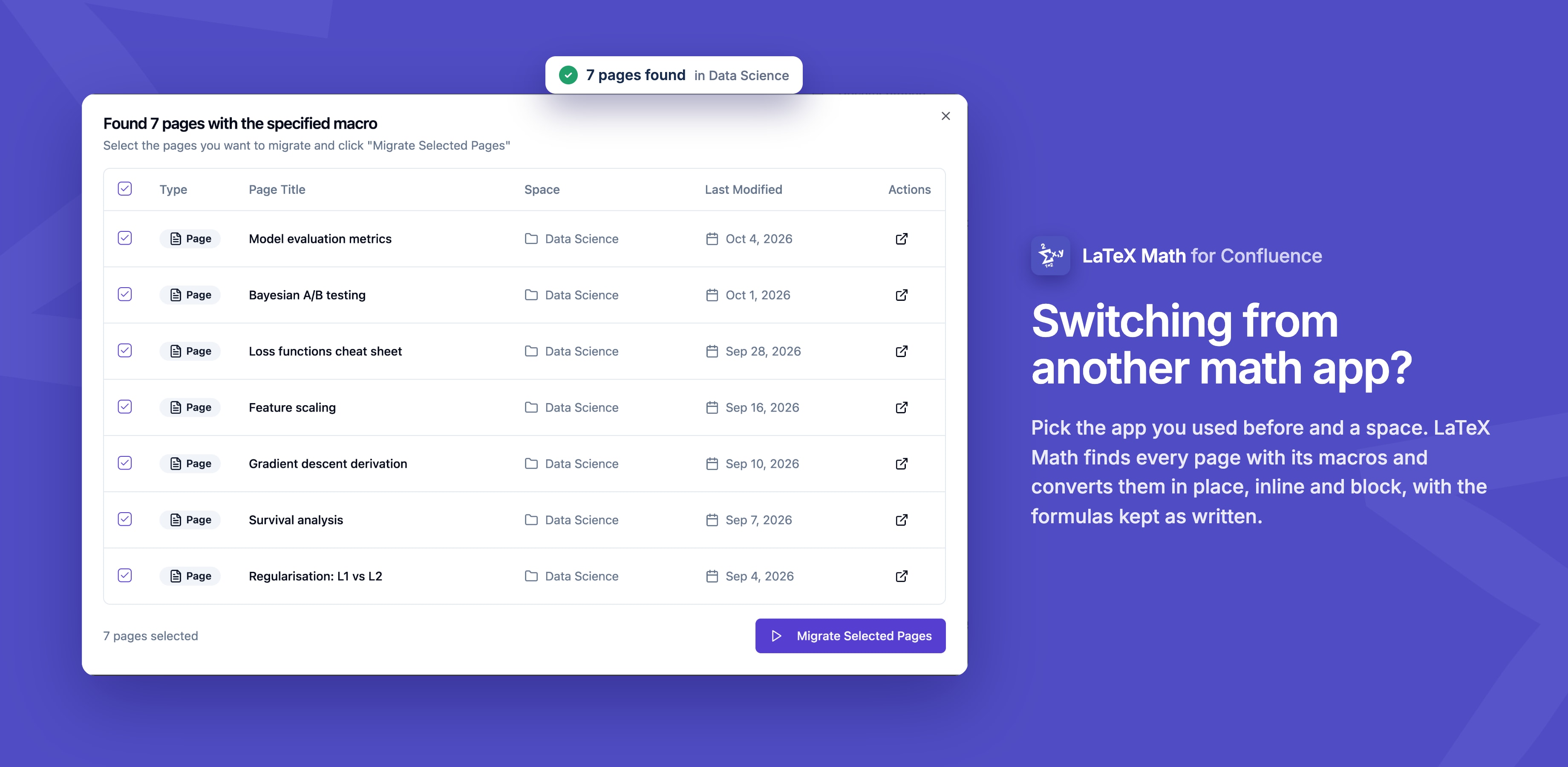
Pick a Confluence space to scan, or search your whole site. The results list each page with its title, space and last modified date, so you can see which pages will be affected.
Step 4: Select Pages and Migrate
Select the pages you want to migrate and run the migration. For each page, the tool:
- Extracts the LaTeX formula from the old macro
- Converts it to the LaTeX Math for Confluence format
- Preserves alignment settings (left, center, right)
- Maps inline equations to inline macros and block equations to block macros
- Saves the page as a new version, so the change is in page history
What Makes It Practical
It Handles Different Storage Formats
Math apps store LaTeX in different ways: XML parameters, rich text bodies, ADF extensions, CDATA sections or plain parameters. The migration engine reads all of these and extracts the LaTeX cleanly.
It's Reversible
Migration doesn't delete your original content. Every migrated page gets a new version, so you can restore the pre-migration state from Confluence's page history. After each batch, the tool reports how many pages succeeded and how many failed, so you know what needs attention.
It Scales
The tool handles pagination and batch processing, so it works for sites with thousands of pages. It moves through the pages steadily without overwhelming the Confluence API.
Advanced Mode
For custom or less common apps, the Advanced tab lets you:
- Enter any macro name to search for
- Filter by body content
- Target specific spaces
- Handle edge cases the standard wizard doesn't cover
What May Not Render After Migration
The migration copies your LaTeX source as it is. LaTeX Math for Confluence renders that source with KaTeX. It does not use MathJax (the "MathJax" above is only part of a source app's name) and it is not a full LaTeX engine. Most math written for other apps renders the same, but a few things can fail:
- Commands from packages KaTeX doesn't implement. If the old app supported extra LaTeX packages, those commands may show an error after migration.
- MathJax-specific extensions, such as loading an extension with
\require{...}. - Drawings and non-math LaTeX, such as TikZ/PGF graphics or document commands. These are not supported.
Before migrating a large space, migrate a few representative pages first and check them. If an equation shows an error, open it in the editor: the live preview shows the problem, and the KaTeX supported functions list and our LaTeX symbol reference help you find a replacement command. Because every page is saved as a new version, you can always roll a page back.
Get Started
Migration support is available in LaTeX Math for Confluence, which is free on the Atlassian Marketplace. Open the app configuration, go to the Migrate from other apps tab and run a search to see which pages use your current app before you change anything.
For full instructions, see the migration guide. If you're new to the app, how to add math equations to Confluence covers inserting and editing equations.
LaTeX Math for Confluence renders inline and block equations with KaTeX, with live preview and optional edit restrictions. Available on the Atlassian Marketplace.